Free pickleball queue app
Run pickleball open play without the clipboard.
qStack runs your open play queue: it picks who plays next, keeps the line fair across every court, and keeps score. Share one code and the whole room follows the same queue on their phones.
Free. No app to download, and no account needed to host or to play.

- games played
- 748
- players queued
- 3,359
- boards hosted
- 283
Made for pickleball open play, and just as good for badminton, tennis, padel, or anything played four to a court.
How it works
Three steps, then it runs itself
- 1
Start a board
Say how many courts you have and how people should be paired up. It takes about twenty seconds, and you can do it without an account.
- 2
Get everyone on it
Type the names in yourself, or share the code and let players add themselves. Everyone who opens it watches the same board, and it updates as games finish.
- 3
Play
The board picks the next four, you tap the winner when they come off, and the queue moves up. It remembers who has played with whom, so the same four do not spend the evening together.
Import from Reclub
Already on Reclub? Bring the whole list.
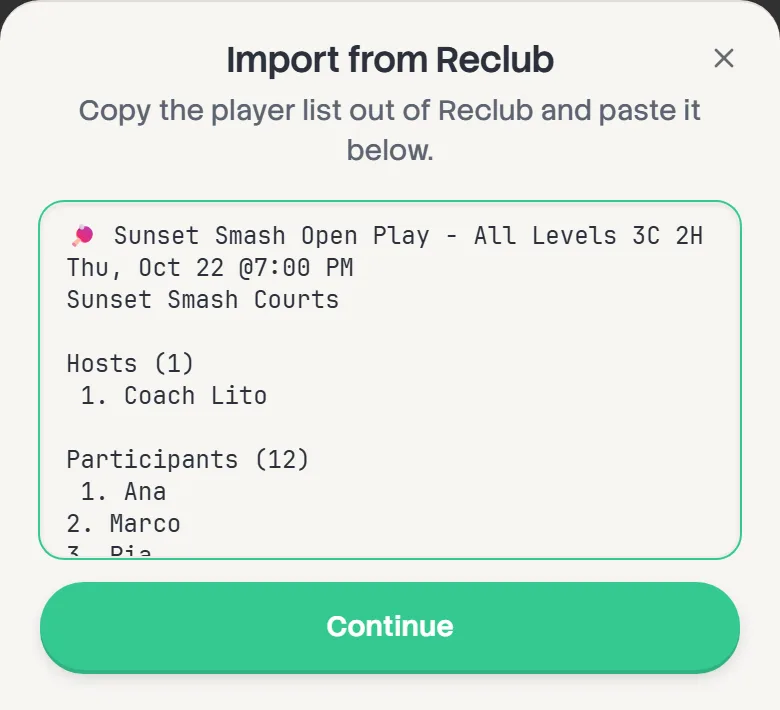
No retyping names at the door. Paste your Reclub event and qStack fills in the players, the session name and the number of courts.
- 1
Copy your list from Reclub
Open your event in Reclub and copy the whole player list, the event heading included.
- 2
Paste it into qStack
Tap Start a board, then Import from Reclub on the first step. Paste, and tap Continue.
- 3
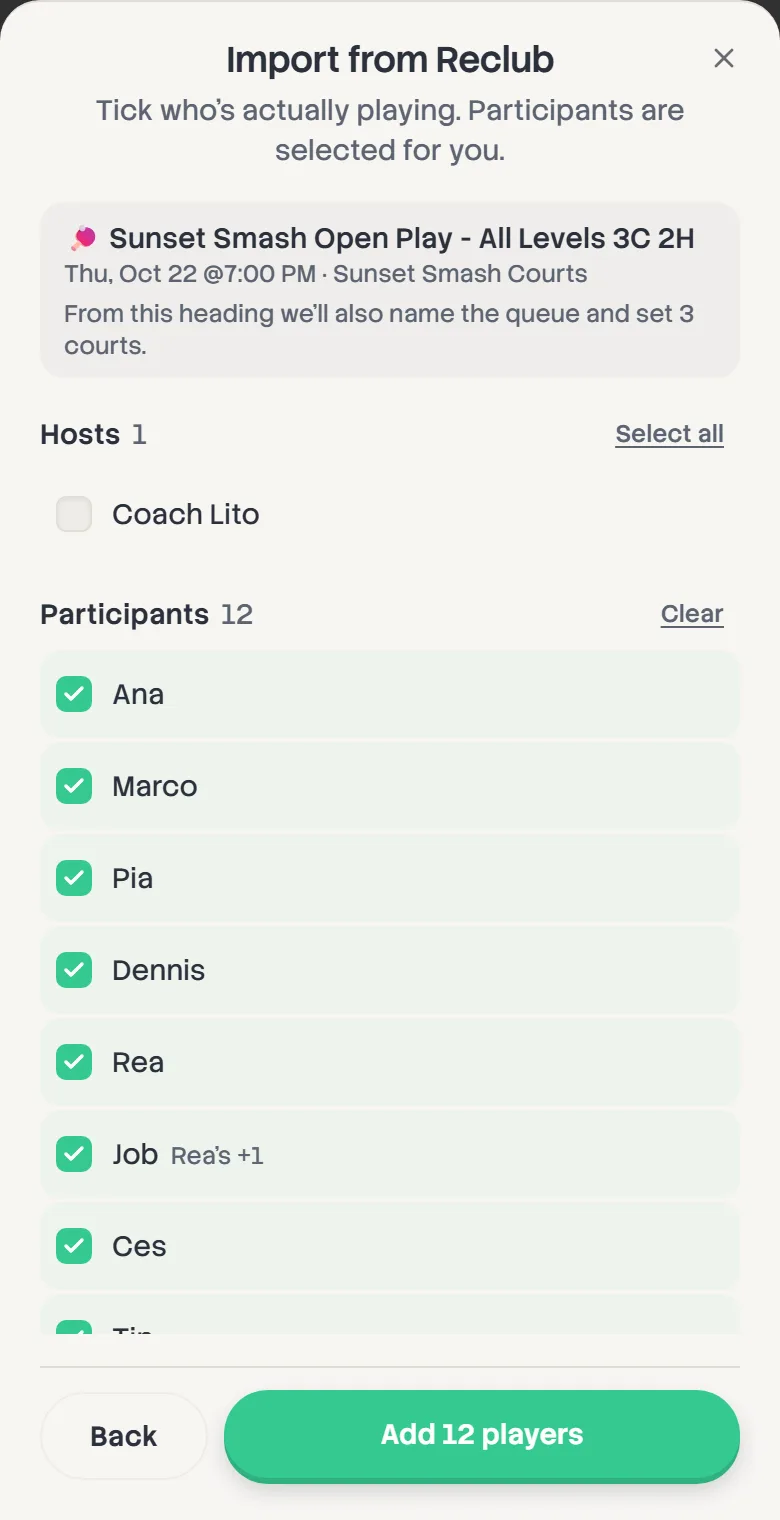
Tick who's playing
Participants come ticked. Add anyone from the Waitlist or Hosts, then tap Add 12 players, or however many you ticked.
- 4
Check them in at the door
Imported players wait off the courts until you tap Check in, so nobody's called before they've arrived.
A heading like “Open Play 3C 2H” sets three courts for you. Already started? You can import on the board too, up until the first game goes on.
Courtside · TV mode
Put the board on the big screen.
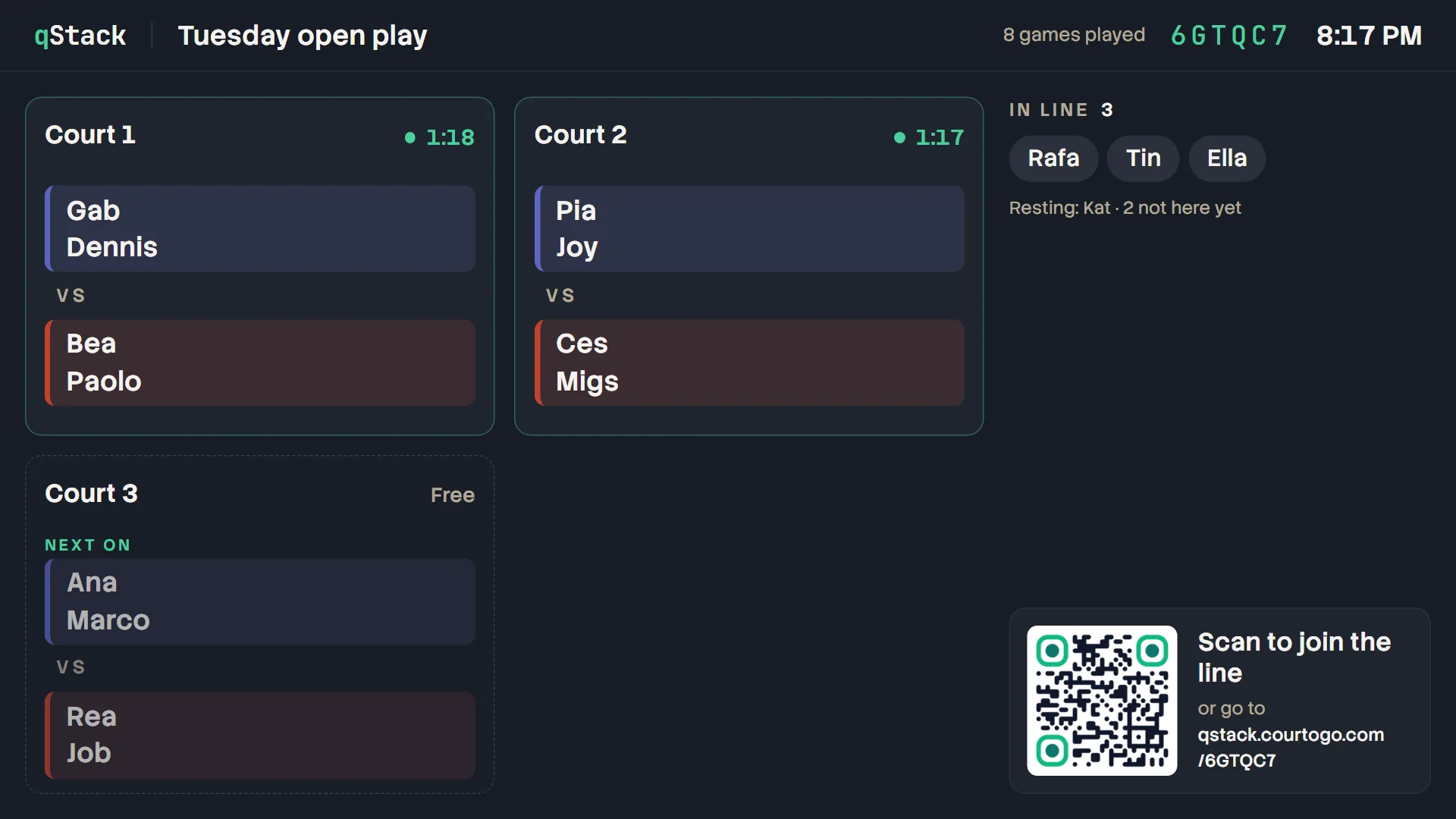
Got a TV at the venue? Courtside fills it with the courts and the line, in names you can read from the back of the hall, so nobody crowds round the host's phone to ask who's next.
Am I on? When am I on?
Every court with who's playing, who goes on the next free one, and the rest of the line in order.
Join from across the room
A QR code sits in the corner, so people scan the TV to join the line instead of hunting for the host.
Nothing to tap, nothing to break
No host controls, even on your laptop. It updates by itself, stays awake, and ends on the final standings.
Tap Courtside at the top of any board, or type its address with /tv on the end into the TV's browser.
Matching styles
Four ways to pair people up
Pick one when you start, and change it whenever the room changes. It takes effect on the next court that frees up.
Round Robin
DefaultEveryone takes turns in the order they arrived.
The one a room can follow without being told how it works: whoever got here first plays first. Somebody arriving late takes their turn like anyone else rather than being caught up, which is the whole of the difference between this and Auto-Balanced.
Auto-Balanced
Evens the games out, catching up whoever is behind.
When people drift in all afternoon and you want everyone finishing on roughly the same number of games. The catching up is visible from the sideline — somebody who arrives late can play several in a row while they make it up.
Winners / Losers
Records resultsWinners keep playing winners. Losers play losers.
Competitive open play. Sorting by result is the one thing it can never mix, so expect to meet about half the room rather than all of it.
Skill Separated
Uses ratingsSimilar ratings play together, with even teams.
Worth it when the room spans a couple of rating points. Keeping courts level means a smaller pool to draw on, so people see the same faces more than they would elsewhere.
Everything a host needs
Made for how open play really goes
The things that go wrong on a Tuesday night, already handled.
Players add themselves
Hold up the QR code. Everyone who scans it joins the queue and follows the board on their own phone.
Fine on bad gym wifi
Every tap lands straight away and is kept on the phone until it can be sent. Nothing waits on the signal.
Co-hosts
Send a co-host link and a friend runs the board from their own phone, with the same controls.
Pass the phone around
Lock it with a passcode. Players can still record who won and start the next game. Anything bigger asks for the code.
Reclub import
Paste the list from Reclub and the names, the session name and the courts fill themselves in.
Fixed partners
Lock two people together and they stay on the same side all night while everyone else rotates.
Requested games
Somebody wants a rematch? Line it up for when they're free, for one game or the next five.
Mistakes fix in a tap
Wrong winner, or swapped partners mid-game? Fix the result and everyone keeps their place in line.
Standings worth sharing
Live standings all session, and a leaderboard card for the group chat when it's over.
Tutorials
Learn it in five minutes
Hosts · 4 min
Host your first session
Set up a board in three short steps, get the first game on, and let the board take it from there.
Read itPlayers · 1 min
Join a board as a player
Scan, type your name, and see when you're up. No app, no account.
Read itHosts and co-hosts · 5 min
Run the courts
Change who's up next, send a group to a free court, swap a player mid-game, and fix a wrong result.
Read itQuestions
What hosts ask first
Do players need an account?
No. They scan the code or open the link and the board is there. Signing in only matters if you want your games kept on your record from one session to the next.
What happens when somebody turns up late?
In Round Robin, the mode a new board starts in, they join the back of the line and wait their turn like anyone else. That is rarely the long wait it sounds like: courts are filled with faces nobody has played yet, and somebody who has just walked in is the freshest face in the room. Auto-Balanced goes further again and seats whoever is owed the most games, which catches a latecomer up quickly at the cost of them playing several in a row.
Can two people play as a fixed pair?
Yes. Lock them together and they stay on the same side of the net all session, while everyone else keeps rotating around them.
Can somebody help me run it?
Send them a co-host link. They get the same controls on their own phone, without your device and without your password.
Your next open play, sorted.
It takes about twenty seconds to start a board, and nobody needs an account to play.
Courtogo is where players book courts and find open play near them. Run a venue? List it on Courtogo.